General Enumeration
Windows / Linux Detection
#os_detection
Windows or Linux can be detected with Network Scan
Linux
TTL=64Windows
TTL=128FTP Enumeration
#ftp
Download all ftp content found
wget -r -nH --ftp-user=web_svc --ftp-password='password' ftp://192.168.23.147/Search in that data for password
grep -r -o "password" ..Git Enumeration
Using the DotGit Extension, we can auto discover the .Git directory
Download the .Git Directory with curl
wget --mirror -I .git http://10.20.122.15/.git/Dump .Git Directory with git_dumper
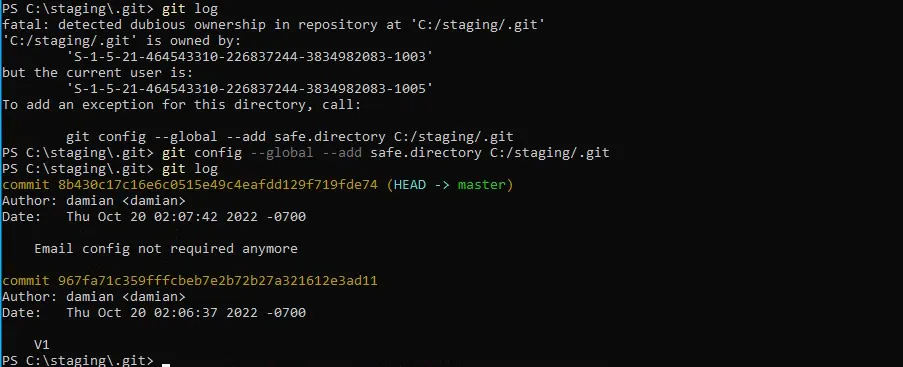
git_dumper http://domain.lab git_dumpAdding directories to Git’s safe list
git config --global --add safe.directory C:/staging/.gitStarting with Git 2.35.2, Git introduced a security feature to prevent running commands in repositories owned by other users (to avoid potential malicious hooks or config execution). If Git detects that the repository directory is owned by a different user than the one running Git, it refuses to operate — unless that directory is explicitly marked as safe.
🛠 What this command does
git config→ modifies Git configuration--global→ applies to your user account (stored in~/.gitconfig)--add→ appends a new entry (instead of overwriting existing ones)safe.directory C:/staging/.git→ tells Git “I trust this repo even if it’s owned by another user or system account.”
Check Deleted files
we will check if there are any contents that we can restore.
To check the git status, we use the git status command
git statusRecover deleted files
we can recover the deleted files using
git checkout -- .Or
git restore .Reading the Logs
To read the logs just use this command
git logSearch for strings inside log
git log --grep="password"more compact way of reading git log
-
One-line commit messages
-
A graph of branches/merges
-
Branch/tag names inline
git log --oneline --graph --decorate --allReading Commits
To read each commit individually we have to use the following command:
git show “commit-id”Cloning the git folder locally
it is sometimes a good idea to clone the git directory locally to check its contents (scripts, source code…) (we used git-server as the .git directory here)
git clone file:///git-server/Cloning the git directory using ssh + private key
if we want to copy a git directory from a server while we have the private key of the git user
GIT_SSH_COMMAND='ssh -i id_rsa -p 4322' git clone git@192.168.148.125:/git-serverPushing to a git server using a private key
add files to be pushed (-A means all)
git add -Acommit changes
git commit -m "pwn"Push the file
GIT_SSH_COMMAND='ssh -i /home/cyber02/Desktop/PG/Linux/Hunit/id_rsa -p 43022' git push origin masterCheck for file difference with context
if we have a file and a backup of the same file, it is easier to check the difference using -U for more context, along with grep using -C for more context
diff -U 8 'PRTG Configuration.old.bak' 'PRTG Configuration.dat' | grep password -C 8